
The Hidden Leak in Your Lead Generation
You’re running Google Ads. Clicks are coming in. The phone should be ringing—but it’s not.
A homeowner searches “water damage restoration near me,” clicks your ad, lands on your page… and leaves within seconds. No call. No form. No job.
Here’s the truth: in most restoration campaigns, the problem isn’t the ads; it’s the landing page.
What Are the Top Landing Page Mistakes That Kill Google Ads Conversions?
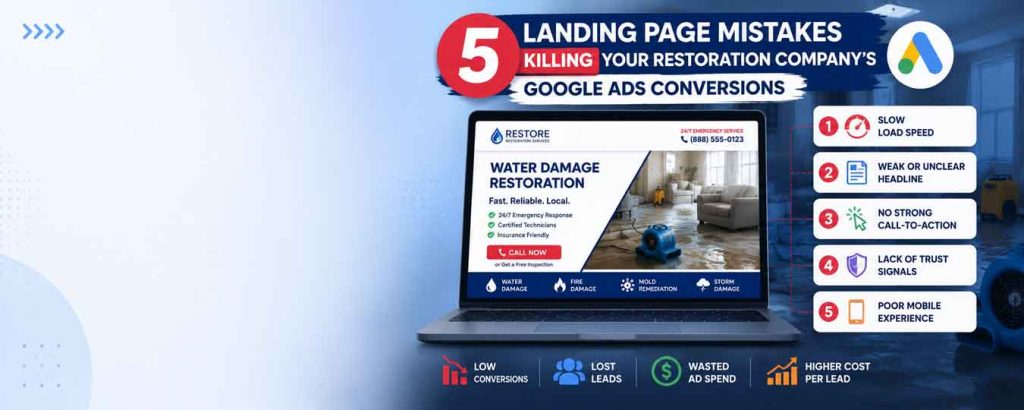
The most common landing page mistakes include slow load speed, weak or unclear messaging, lack of trust signals, poor mobile experience, and no clear call-to-action. These issues create friction, confuse visitors, and reduce urgency—leading to lost leads even when your ads are targeting the right people.
In emergency-based services like water damage, fire restoration, and mold remediation, even a small delay or confusion can cost you a job worth $3,000–$15,000.
Why Landing Pages Matter More Than Ads (Especially for Restoration)
Google Ads drives intent-based traffic. That means your visitors are already searching for help.
But here’s the key insight:
Ads get the click. Landing pages get the conversion.
If your page doesn’t immediately match the user’s urgency and expectation, they’ll go to the next company—fast.
Real-World Insight:
In one campaign managed by Akhlak, improving the landing page alone increased conversion rate from 6.2% to 14.8% without changing ad spend.
The 5 Landing Page Mistakes Costing You Leads
1. Slow Page Speed (You’re Losing Leads in Seconds)
What happens:
Your page takes more than 3 seconds to load. The visitor leaves before even seeing your offer.
Why it kills conversions:
- Restoration searches are urgent (“flood in basement now”)
- Users won’t wait—especially on mobile
- Google also penalizes slow pages with higher CPCs
Fix it:
- Compress images (use WebP format)
- Use fast hosting (US-based servers for US audience)
- Minimize scripts and plugins
- Use tools like Google PageSpeed Insights
Benchmark:
- Ideal load time: under 2 seconds
- Conversion drop: up to 32% increase in bounce rate after 3 seconds
Quick Summary: Faster pages = more calls.
2. Weak or Generic Headline (No Immediate Relevance)
What happens:
Your headline says something vague like:
“Professional Restoration Services You Can Trust”
But the user searched:
“Emergency water damage repair Houston TX”
Why it fails:
There’s no message match. The visitor doesn’t feel confident they’re in the right place.
Fix it:
Use hyper-specific, intent-matching headlines:
Example:
“24/7 Emergency Water Damage Restoration in Houston – Fast Response in 60 Minutes”
Best Practices:
- Include location (city/state)
- Include service (water/fire/mold)
- Include urgency (24/7, emergency, fast)
Quick Summary: Match the search intent instantly or lose the lead.
3. No Strong Call-to-Action (CTA)
What happens:
Visitors scroll but don’t know what to do next.
Why it kills conversions:
People need direction, especially in stressful situations like water damage.
Fix it:
Use clear, visible CTAs above the fold:
- “Call Now for Immediate Help”
- “Get Free Inspection Today”
- “Speak to a Restoration Expert Now”
CTA Placement Checklist:
- Top of the page
- Sticky mobile button
- After every section
- Near trust signals
Pro Tip:
Use click-to-call buttons for mobile users (most restoration traffic is mobile).
Quick Summary: If you don’t guide them, they won’t convert.
4. Lack of Trust Signals (No Proof = No Action)
What happens:
Your page looks okay, but there’s no reason to trust you.
Why it matters:
Restoration jobs are high-ticket. People won’t risk hiring an unknown company.
Missing elements often include:
- Reviews or testimonials
- Certifications (IICRC, insurance approved)
- Before/after images
- Years of experience
- Real team photos
Fix it:
Add trust elements strategically:
- “4.9 Rating from 120+ Customers”
- “Certified & Insured Restoration Experts”
- “Serving Houston for 10+ Years”
Case Insight:
Adding testimonials and badges increased conversion rate by ~35% in one campaign
Quick Summary: Trust reduces hesitation.
5. Poor Mobile Experience (The Silent Conversion Killer)
What happens:
Your page looks fine on desktop—but broken or slow on mobile.
Why it matters:
- Over 70%+ of restoration searches are mobile
- Users need fast, easy interaction
Common issues:
- Tiny text
- Hard-to-click buttons
- Long forms
- Slow load speed
Fix it:
- Use responsive design
- Make buttons large and clickable
- Keep forms short (name + phone only)
- Add tap-to-call CTA
Mobile Optimization Table:
| Element | Bad Example | Optimized Version |
| Button size | Small text link | Large tap-friendly button |
| Form fields | 6–8 fields | 2–3 essential fields |
| Load speed | 4+ seconds | Under 2 seconds |
| Navigation | Complex menus | Minimal or hidden |
Quick Summary: If mobile fails, your campaign fails.
Step-by-Step Framework to Fix Your Landing Page
Step 1: Match Search Intent
- Align headline with keyword
- Use location + service + urgency
Step 2: Optimize Speed
- Reduce load time under 2 seconds
- Test regularly
Step 3: Build Trust Fast
- Add reviews, certifications, proof
- Show real experience
Step 4: Simplify Conversion Path
- Clear CTA
- Minimal form
- Click-to-call enabled
Step 5: Mobile-First Design
- Test on real devices
- Prioritize ease of use
Framework Summary: Clarity + speed + trust + simplicity = conversions.
Real Example: Before vs After Optimization
Before:
- Generic headline
- No reviews
- Slow page (4.2s load time)
- No clear CTA
Conversion Rate: 5.4%
After:
- Location-based headline
- Added testimonials + badges
- Load speed improved to 1.8s
- Strong CTA with click-to-call
Conversion Rate: 13.9%
Increase: +157% more leads
Frequently Asked Questions (FAQs)
How much does a high-converting landing page cost?
A professional landing page for restoration services typically costs between $500–$3,000 depending on complexity. However, even small improvements can significantly increase ROI.
Is it worth optimizing my landing page if my ads are already running?
Yes. In fact, optimizing your landing page often delivers faster and cheaper results than increasing ad spend because it improves conversion rate.
How long does it take to see results after optimization?
Most changes show impact within 1–2 weeks, especially for traffic-heavy campaigns. A/B testing may take longer for statistically significant results.
Should I use one landing page for all services?
No. Each service (water, fire, mold) should have its own page to match user intent and improve relevance.
What is the ideal conversion rate for restoration landing pages?
A good benchmark is 10–20%. High-performing campaigns can exceed 20% with strong optimization.
Do I need a separate page for each city?
Yes, if you target multiple locations. Localized pages improve relevance and increase conversion rates.
What’s better: long-form or short landing pages?
Short and focused pages work best for emergency services. Users want fast answers and quick action.
Conclusion: Fix the Page, Unlock the Leads
If your Google Ads aren’t converting, don’t rush to blame targeting or budget.
In most cases, the landing page is the real bottleneck.
Fix these five mistakes:
- Speed
- Messaging
- CTA
- Trust
- Mobile experience
…and you’ll see a direct impact on leads, cost per conversion, and revenue.
Ready to Turn Clicks Into Calls?
At Akhlak, we specialize in Google Ads and landing page optimization for restoration companies across the United States.
Get a Free Google Ads & Landing Page Audit. Contact Me.
We’ll identify exactly where you’re losing leads and how to fix it.
- No obligation
- Actionable insights
- Proven strategies
